Pre production documents
Visualisation diagram
A visualisation diagram is a drawing created by hand or digitally showing what it will look like when its created.
Included in a visualisation diagram is the layout of the page, colours used, white space, placement of text and images, annotations to give details for all of the above.
It is needed to see what the final product should look like.
Products like animations sometimes use visaulisation diagrams.
A disadvantage of a visualisation diagram is that different people may interpret it differently, making the final product different to the original interpretation of the product.
An advantage is that the representation is more effective as a graphical representation than a long textual file. They can visually see what the final product should look that and try to correctly complete this final product.
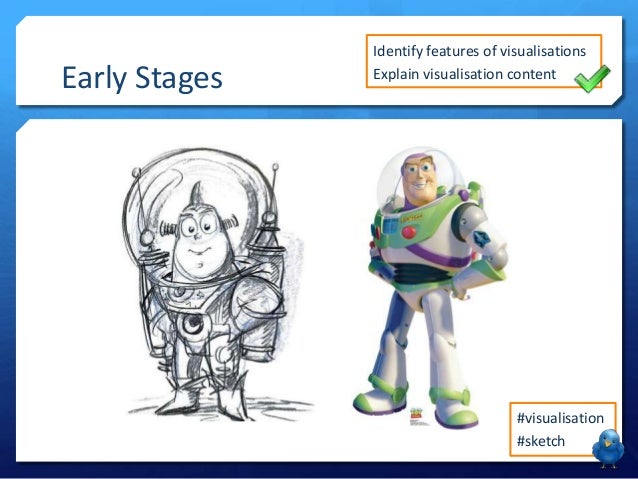
Visualisation diagram
A visualisation diagram is a drawing created by hand or digitally showing what it will look like when its created.
Included in a visualisation diagram is the layout of the page, colours used, white space, placement of text and images, annotations to give details for all of the above.
It is needed to see what the final product should look like.
Products like animations sometimes use visaulisation diagrams.
A disadvantage of a visualisation diagram is that different people may interpret it differently, making the final product different to the original interpretation of the product.
An advantage is that the representation is more effective as a graphical representation than a long textual file. They can visually see what the final product should look that and try to correctly complete this final product.
Story boards
- An essential planning device in the film and TV sectors of media
- Mostly used by directors as it allows them to think in advance about how they want the narrative of their media product to develop
- It also allows them to think through technical and audio codes they might use to create this narrative.
- Making a storyboard helps media producers think through the moving image in their minds and then on paper, with camera shots, angles and transitions all included.
- If a storyboard is well constructed and thought out, it saves a lot of time and money when filming a moving image of the text.
Story board conventions
- Shot description, number and duration- a short description of what will be happening in each shot. Each shot must have a number and include how long it will last as this helps us work out the final film duration and order.
- Visuals- drawings of what will happen in each scene. These can be really detailed or line drawings. Sometimes photographs are added. The image should show how the shot should be framed and include any key props (mise en scene).
- Technical codes- What camera shots and angles should be used for each shot. Also a suggestion of what edit will take place between each shot. Arrows may also be used to show any movement off the camera, such as zoom pans.
- Audio codes- Sounds that are to be included in the shot can be described. These need to be clearly identified as diegetic (naturally part of the scene) or non-diegetic (added to the scene), such as music, dialogue and sound effects.
- Shot by shot list works alongside a storyboard and script and is very important.
Camera language
Camera angles-
- A low angle shot, makes the subject look powerful and makes an audience feel inferior. It also emphasises the emotions shown on the actors faces.
- High angle shots make the subject look small and weak, making the audience feel as though they have the authority and control over the subject.
- Birdseye view, looking straight down from above, like a plan or a layout.
- Worms eye view, makes the world look huge.
Camera positions-
- Side view, seeing things from an observers point of view.
- Direct frontal view, emphasises intensity of the scene as they are face to face, but we can only identify one of the people. Also known as an over the shoulder shot.
- Shot reverse shot- Film in one direction and then the opposite direction.
- Connects the shots.
Scripts (screenplay)
- A piece of writing in the form of drama
- Different to prose form of writing, like novels and short stories and it is meant to be performed either on stage, radio, television or film.
- When a script is written for film or TV, it is also known as screenplay.
- A script has to consist of sound effects when read aloud, meaning it has to be written in a special way.
- A script consists of dialogue (what the characters say to each other), stage directions and instructions to the actors and directors.
What do you notice about the layout/formatting of the script?
- Stage directions
- The name of the character reading the line is in the middle of the page above their dialogue in that scene.
- It has a lot of capital letters
Why might this be done?
It can be easily read by the actors and easy for the directors and cast to understand.
How are the words to be said formatted?
They are indented
Script conventions-
- Scene heading
- Action
- Character name
- Parenthetical (brackets)
- Dialogue
First line- In capitals INT (internal) or EXT (external) setting.
Exact location and the time of day
Characters name- Always in capitals
Description of action- Explains the scene in detail
Character intonation- in brackets
Spacing- an empty line after each piece of information.
Great work! This was when you had to research into your own pre-production document - really strong notes.
ReplyDeleteMiss C